Businesses across retail, warehousing, manufacturing, logistics, e-commerce, and distribution rely on accurate labeling for product identification, inventory control, shipping, and traceability. As business volumes grow, choosing the right barcode printer becomes important for maintaining consistent label quality and efficient operations.
The Best barcode printer in India is not necessarily the fastest or most expensive model. The right printer depends on print volume, label requirements, printing technology, operating environment, connectivity, and integration with existing business systems.
This guide explains the main types of barcode printers, their applications, key features, and the factors businesses should consider before selecting a barcode printing solution.
What Is a Barcode Printer?
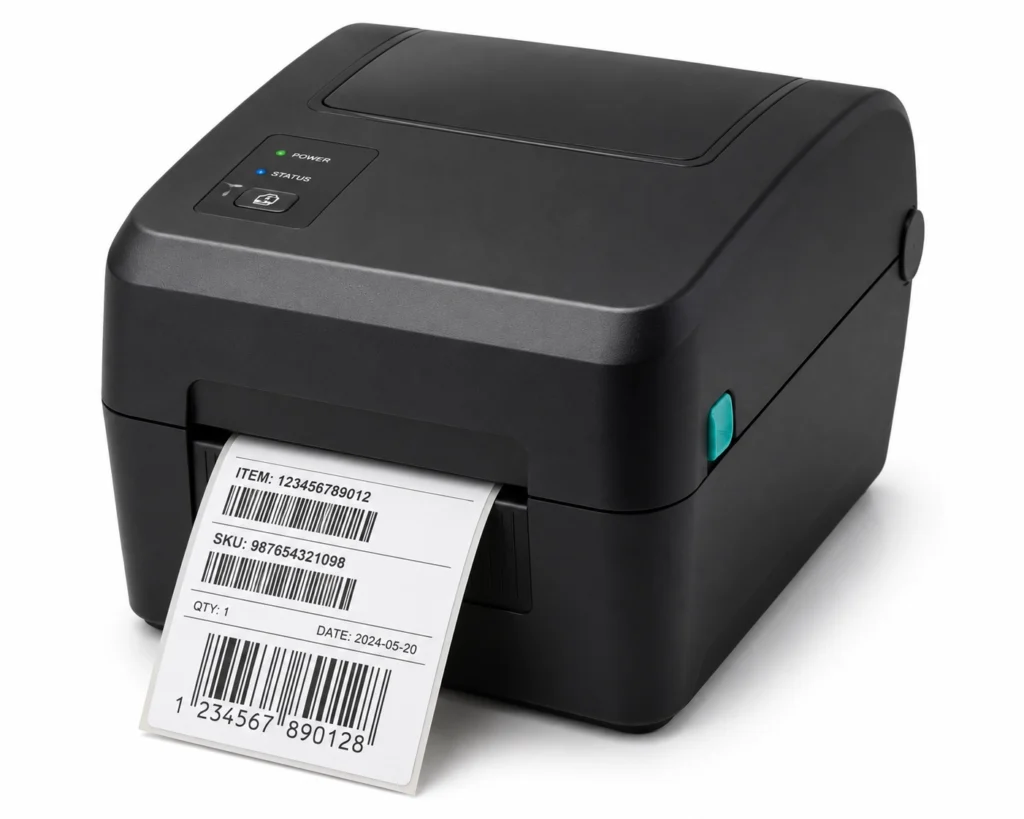
A barcode printer is a specialized printing device designed to produce machine-readable labels for products, inventory, assets, shipments, cartons, and other business applications.
Unlike conventional office printers, barcode printers are designed for continuous label printing and support different media sizes, resolutions, print speeds, and printing technologies.
Common types include desktop barcode printers, industrial barcode printers, mobile barcode printers, direct thermal printers, and thermal transfer printers.
Barcode printers can also integrate with barcode scanners, mobile computers, Warehouse Management Systems (WMS), Enterprise Resource Planning (ERP) platforms, inventory software, POS systems, and other Automatic Identification and Data Capture (AIDC) technologies.
How to Choose the Right Barcode Printer
There is no single printer suitable for every business. Selection should begin with the application and operating environment.
Consider:
- Daily or monthly print volume
- Label size and material
- Required print speed and resolution
- Direct thermal or thermal transfer technology
- Connectivity requirements
- Ribbon and media compatibility
- Available workspace
- Operating conditions
- WMS, ERP, or POS integration
- Future printing requirements
A retail store may need a compact desktop printer for product labels, whereas a manufacturing facility with continuous labeling requirements may require a rugged industrial printer.
Find the Right Barcode Printer for Your Business
Types of Barcode Printers
Desktop Barcode Printers
Desktop barcode printers are compact and generally suitable for low-to-medium printing volumes. They are commonly used in retail stores, offices, healthcare facilities, small warehouses, and other environments where space is limited.
Industrial Barcode Printers
Industrial barcode printers are designed for high-volume and continuous printing. They are commonly used in manufacturing plants, warehouses, logistics operations, distribution centers, and production environments.
They typically provide durable construction and higher media capacity for demanding workloads.
Mobile Barcode Printers
Mobile barcode printers allow users to print labels at the point of activity. They are useful for inventory checks, shelf labeling, delivery operations, warehouse tasks, and field applications where fixed printing is inconvenient.
Direct Thermal vs Thermal Transfer
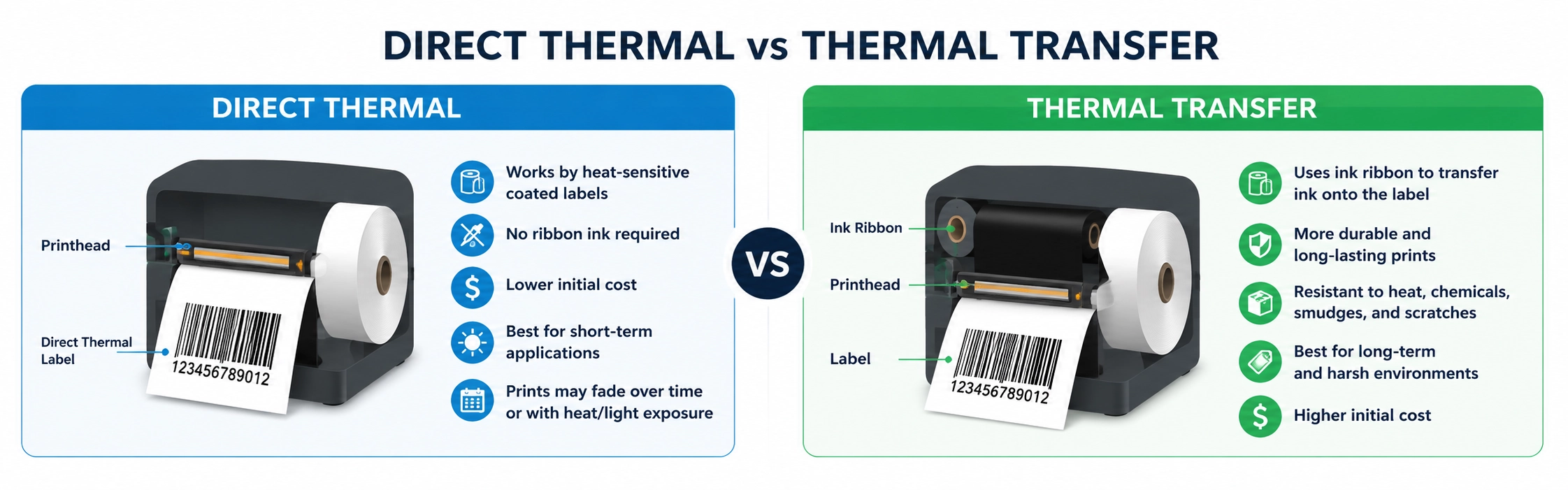
One of the key decisions when selecting a barcode printer is choosing between direct thermal and thermal transfer printing.
Direct thermal printing produces images directly onto heat-sensitive media and generally does not require a ribbon. It is commonly used for shipping labels, receipts, temporary labels, and applications where long-term durability is not essential.
Thermal transfer printing uses a ribbon to transfer ink onto the label material. It can produce more durable labels suitable for manufacturing, product identification, asset tracking, inventory, and applications exposed to environmental conditions.
The appropriate technology depends on label lifespan, material, environmental exposure, and application requirements.
Barcode Printers for Warehousing and Logistics
Warehouses and logistics companies use barcode labels for products, cartons, pallets, storage locations, shipments, and assets.
Printer selection should consider print volume, speed, media requirements, and operating conditions. High-volume facilities may require industrial barcode printers, while smaller warehouses can often use desktop models.
Integration with a Warehouse Management System (WMS) can automate label generation using product, order, inventory, or shipment information, helping reduce manual entry and maintain labeling consistency.
Barcode Printers for Manufacturing
Manufacturing operations often require durable identification throughout production and distribution.
Barcode printers can support:
- Product identification
- Batch and lot labeling
- Serial number tracking
- Work-in-progress identification
- Asset labeling
- Packaging and finished-goods labels
- Shipping labels
Manufacturers should consider printer durability, print volume, resolution, media type, ribbon requirements, connectivity, and integration with production or ERP systems.
Choose the Right Barcode Printer – Get a Free Consultation
Important Barcode Printer Features
Print Resolution
Resolution is measured in DPI and affects the clarity of printed labels. Higher resolution can be useful for small labels, compact barcodes, and detailed graphics.
Print Speed
Print speed is important in warehouses, logistics operations, and manufacturing environments where large quantities of labels are produced.
Connectivity
Depending on the workflow, businesses may require USB, Ethernet, Wi-Fi, Bluetooth, or other connectivity options.
Media Compatibility
Before purchasing, verify compatibility with the required label width, material, roll size, ribbon type, and media configuration.
Durability
Printers used in industrial environments may need to withstand continuous operation, dust, temperature variations, and other demanding conditions.
Barcode Printer Integration with AIDC Systems
A barcode printer is often part of a broader identification and data-capture workflow.
It can operate alongside barcode scanners, mobile computers, RFID systems, WMS, ERP, inventory management software, and POS platforms.
For example, a WMS can generate label information for a product or shipment. The printer produces the label, while a barcode scanner captures the information during receiving, picking, packing, stock verification, or dispatch.
This connected approach can improve traceability and reduce manual data entry.
Barcode Printing Solutions from Stallion Global
Stallion Global provides barcode, RFID, automation, POS, software, consumables, and AIDC solutions for businesses across multiple industries.
With 30+ years of experience, Stallion brings practical expertise in barcode identification, printing, scanning, mobile computing, RFID, and business automation. This experience enables businesses to evaluate printing solutions based on their actual workflows rather than specifications alone.
Stallion supports diverse barcode printing requirements with desktop, industrial, and mobile solutions. The company also works with established technology manufacturers and technology ecosystems, including Honeywell, to help customers identify appropriate hardware and supporting technologies.
Stallion is a Honeywell Diamond Partner in India, supporting customers with Honeywell’s barcode scanning, printing, mobile computing, and data-capture technologies.
From Kochi, Kerala, Stallion supports businesses across India and the Middle East, including the UAE, Qatar, and Oman, with barcode and AIDC solutions aligned with different industry and operational requirements.
How to Select the Best Barcode Printer
When searching for the Best barcode printer in India, consider the complete application rather than focusing only on specifications.
Ask:
- How many labels are printed each day?
- What label size and material are required?
- Is direct thermal or thermal transfer more appropriate?
- How durable must the labels be?
- What print speed and resolution are needed?
- Where will the printer operate?
- Does it require WMS, ERP, POS, or inventory integration?
- What connectivity options are required?
- Will printing requirements increase in the future?
- What is the total cost of ownership?
A professional assessment can help determine whether a desktop, industrial, or mobile barcode printer is appropriate.
Looking for the Best Barcode Printer? Get a Quote Today
Frequently Asked Questions
Which is the best barcode printer in India?
The right printer depends on the application. Desktop printers suit lower-volume operations, industrial printers support demanding workloads, and mobile printers are useful for on-demand printing at different locations.
Which barcode printer is best for warehouses?
Industrial printers are generally suitable for high-volume warehouse applications, while desktop models can meet smaller operational requirements. Print volume, label type, environment, and WMS integration should guide the decision.
Can barcode printers integrate with WMS and ERP?
Yes. Suitable barcode printers can work with WMS, ERP, POS, inventory management, and other business systems to automate label generation and support consistent data capture.
Is an industrial barcode printer necessary for manufacturing?
Not always. Industrial printers are appropriate for high-volume or demanding production environments, while desktop models can be suitable for smaller applications.