Managing inventory efficiently is essential for businesses across manufacturing, retail, e-commerce, logistics, distribution, and supply chain operations. As warehouses handle more products, orders, and transactions, spreadsheets and manual processes can make it difficult to maintain accurate stock information and coordinate daily activities.
A Warehouse Management System (WMS) provides a centralized platform for managing inventory, warehouse activities, order fulfillment, and stock movements. However, choosing the right system involves more than comparing software features. Businesses need to consider their workflows, inventory requirements, existing technology, integration needs, scalability, and long-term goals.
This guide explains How to Choose a Warehouse Management System and the key factors to consider before investing in WMS software.
What Is a Warehouse Management System?
A Warehouse Management System is software designed to manage and optimize warehouse operations. It can support receiving, put-away, storage, picking, packing, replenishment, inventory tracking, and dispatch.
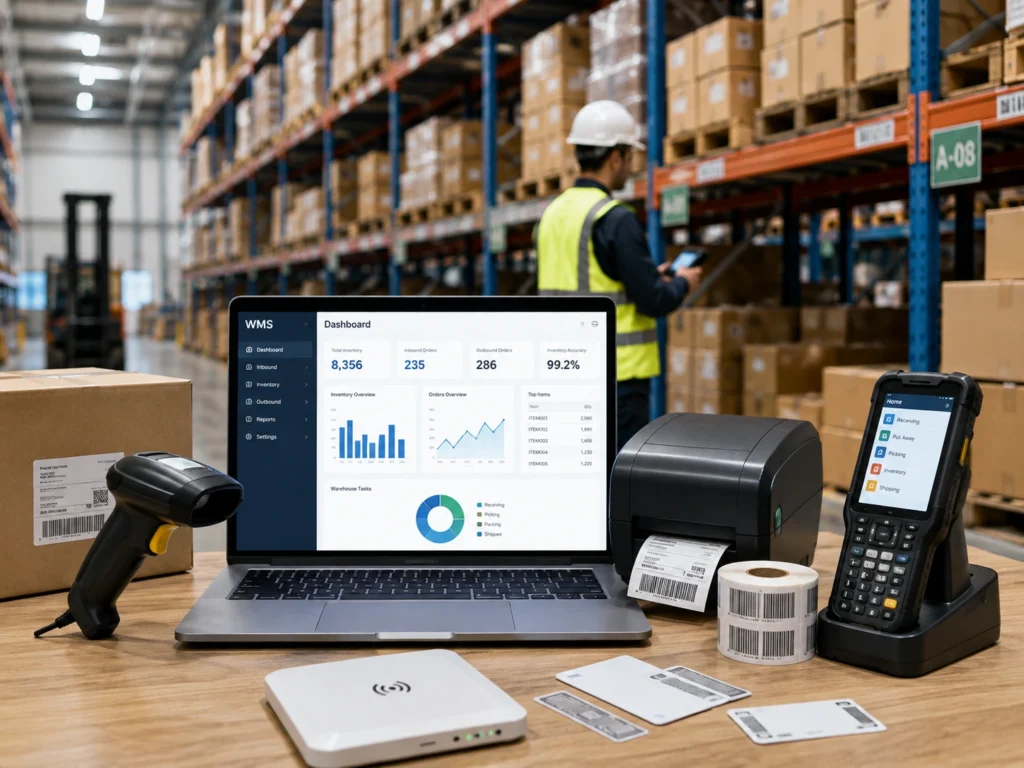
A WMS can also connect with Automatic Identification and Data Capture (AIDC) technologies such as barcode scanners, barcode printers, RFID readers, RFID tags, and mobile computers.
Integration with an Enterprise Resource Planning (ERP) system can connect warehouse activities with purchasing, sales, finance, and other business processes. This creates a more connected flow of information between the warehouse and the wider organization.
Why Does Your Business Need a WMS?
A WMS can replace disconnected manual activities with structured digital workflows. Depending on the system and implementation, it can help businesses manage:
- Receiving and put-away
- Storage locations and bin management
- Inventory tracking
- Stock transfers
- Picking and packing
- Replenishment
- Cycle counting
- Order fulfillment
- Dispatch and shipment verification
- Returns
- Batch, lot, and serial number tracking
These capabilities can contribute to better inventory accuracy, faster order processing, improved traceability, and more efficient warehouse operations.
However, every warehouse has different requirements. A small operation may need basic inventory and barcode functionality, while a large distribution center may require RFID, advanced reporting, multiple warehouse support, automation, and complex system integrations.
Optimize Your Warehouse with the Right WMS Solution
How to Choose a Warehouse Management System
When deciding How to Choose a Warehouse Management System, begin with your operational requirements instead of selecting software based only on the number of available features.
1. Analyze Your Warehouse Workflow
Map the complete process from receiving goods to final dispatch. Identify areas where manual data entry, stock discrepancies, picking errors, or delays are affecting productivity.
The WMS should address these specific challenges without adding unnecessary complexity.
2. Evaluate Inventory Management Requirements
Your WMS should support the way your business stores and tracks products. Depending on your industry, important capabilities may include:
- SKU-level inventory tracking
- Bin and location management
- Batch and lot tracking
- Serial number tracking
- Expiry date management
- Stock transfers
- Cycle counting
- Replenishment
- Returns management
Businesses handling regulated, high-value, or time-sensitive products may also require detailed traceability and transaction history.
3. Check Barcode and RFID Compatibility
Barcode scanning is widely used for warehouse data capture. A suitable WMS should be compatible with handheld barcode scanners, industrial scanners, mobile computers, and barcode printers where required.
For businesses that need automated or multi-item identification, RFID integration can provide additional capabilities. RFID readers and tags can support inventory tracking, asset management, automated checkpoints, and other applications where conventional scanning may be less efficient.
Selecting software that can support existing and future AIDC technologies can make the warehouse infrastructure easier to scale.
4. Consider ERP and Software Integration
A WMS generally works alongside other business applications. Integration with ERP, accounting, e-commerce, order management, POS, or other platforms may be important for maintaining consistent data.
Before selecting a system, evaluate its integration capabilities, APIs, data synchronization, user access, reporting, and technical support.
Effective integration can reduce duplicate data entry and improve information flow between warehouse and business operations.
5. Evaluate Scalability
A WMS should support your current operation while allowing room for growth.
Consider whether the platform can accommodate:
- More SKUs
- Higher transaction volumes
- Additional warehouses
- Multiple storage locations
- More users
- New sales channels
- Additional barcode and RFID devices
A scalable system can help businesses expand without having to replace their core warehouse software prematurely.
Get a Scalable WMS Solution Built for Your Business
Cloud vs On-Premise WMS
Businesses may choose between cloud-based and on-premise WMS solutions.
A cloud WMS is hosted remotely and accessed through an internet connection. It can provide flexible access, centralized updates, and easier deployment across multiple locations.
An on-premise WMS operates within the organization’s own IT infrastructure. It can provide greater control over infrastructure and data management but may require more internal IT resources.
The appropriate model depends on security requirements, connectivity, IT capabilities, integration needs, budget, and business strategy.
WMS and Warehouse Automation
A WMS can serve as an important software component of a broader warehouse automation strategy.
It can work with barcode scanners, RFID systems, mobile computers, printers, conveyors, and other warehouse technologies. For example, a barcode scanner can capture a product code during receiving, while the WMS processes the transaction and updates the inventory record.
In more advanced environments, WMS platforms may integrate with Warehouse Control Systems (WCS), Warehouse Execution Systems (WES), Automated Storage and Retrieval Systems (AS/RS), Automated Guided Vehicles (AGVs), or Autonomous Mobile Robots (AMRs).
The level of automation should be based on operational requirements, warehouse complexity, expected volumes, and return on investment.
What Should You Look for in a WMS Provider?
Software functionality is only one part of a successful WMS implementation. The solution provider’s experience can also influence the outcome.
Look for a provider with knowledge of:
- Warehouse workflows
- Barcode and RFID technology
- AIDC solutions
- Hardware and software integration
- ERP connectivity
- User training and implementation
- Technical support
- Future scalability
A provider with expertise in both software and data-capture technologies can help create a more connected warehouse environment.
WMS Solutions from Stallion Global
Stallion Global provides warehouse, barcode, RFID, automation, POS, software, and AIDC solutions for businesses across multiple industries.
With 30+ years of experience in AIDC and business technology, Stallion understands the practical requirements involved in connecting warehouse software with barcode, RFID, mobile computing, printing, and other data-capture technologies.
Its portfolio includes handheld and industrial barcode scanners, barcode printers, mobile computers, RFID readers, RFID tags, antennas, POS systems, software, consumables, and related technologies.
Stallion is also a Honeywell Diamond Partner in India, supporting businesses with Honeywell’s scanning, mobile computing, printing, and data-capture technologies. Along with Honeywell, Stallion works with established technology manufacturers and solution ecosystems, helping customers evaluate solutions according to their specific operational requirements.
This combination of AIDC expertise, technology partnerships, and industry experience allows Stallion to approach warehouse technology as an integrated business solution rather than treating software, hardware, and data capture as separate requirements.
WMS Solutions Across India and the Middle East
Stallion Global supports organizations across India and the Middle East, including businesses in the UAE, Qatar, and Oman.
From Kochi, Kerala, Stallion supports warehouse technology requirements across manufacturing, retail, logistics, distribution, e-commerce, and other industries.
For businesses operating across these markets, WMS selection should take into account the existing technology environment, warehouse processes, business scale, integration requirements, and future expansion plans.
Whether the requirement involves inventory management, barcode-based warehouse operations, RFID tracking, mobile data capture, ERP integration, or broader warehouse automation, the system should be selected around the actual business workflow.
Upgrade Your Warehouse with Smart WMS Solutions
Frequently Asked Questions
What is the most important factor when choosing a WMS?
The most important factor is how well the system matches your warehouse processes and business requirements. Functionality, integration, scalability, usability, implementation support, and total cost should all be evaluated.
Can a WMS work with barcode scanners?
Yes. WMS software can integrate with barcode scanners, mobile computers, barcode printers, and other data-capture devices to support receiving, picking, inventory checks, and dispatch.
Can RFID be integrated with a WMS?
Yes. RFID readers and tags can be integrated with suitable WMS platforms for automated identification, inventory tracking, asset management, and other warehouse applications.
Should a small business use a WMS?
A WMS can benefit small and growing businesses when manual inventory processes become difficult to manage. The system should be appropriately scaled to current requirements while allowing for future growth.